SYSDEM – The End-to-End Software Solution
for the Food Manufacturing & Meat Processing Industry

Intake, Into Production, Food Weighing, Labelling, Packing, Sales Order Picking & Despatch. Lot Traceability Software, Food Safety Audits, Quality Checks & HACCP

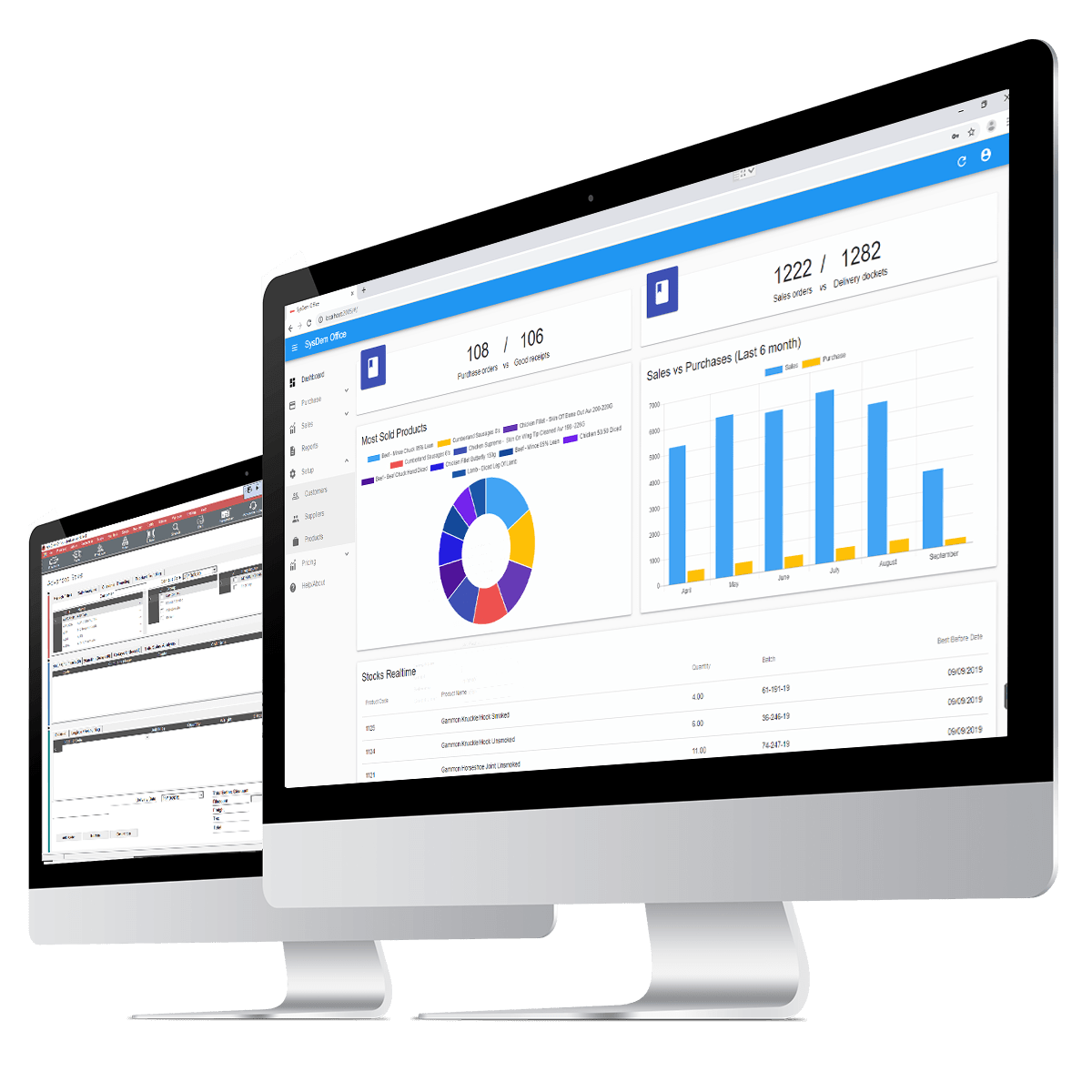
system dashboard

Food Manufacturing Software – SYSDEM Overview

SYSDEM Food Manufacturing Software delivers a comprehensive, office and factory management system for the Food Industry that manages purchasing, sales, production and delivery. Utilizing the latest technologies and compatible with tablets and mobile devices, SYSDEM offers a real-time view of your Food Manufacturing or Meat Processing business anytime, anywhere, on any device.

The software is fully integrated with easy-to-use operator interfaces on the factory floor and hardware such as barcode scanners, touchscreen PCs, high-speed industrial printers, handheld mobile computers and weighing scales to capture the data and processes you need to ensure quality and control over your food products and meet safety and compliance standards.

Purchasing

The Sys|dem Office application can be used to create Purchases in the office, ahead of when the orders are due to be received in the factory.

The orders will typically capture the supplier, product, quantity/weight ordered, and ideally, the price agreed, as well as the expected delivery date.

Prices can be stored at the product, or Supplier/Product level, or manually entered when placing an order. They can also be used to capture notes that relate to the specific Purchase Order

The expected weight and quantity will be entered for the Goods In staff to reference during the booking in process.

1
Software for Food and Meat Processors
1

The intuitive user interface makes the hardest tasks an easy job. Place purchase orders, manage sales, create production orders, view traceability, stock reports and invoicing…

mobile sale ordering software

Sales Orders

Sales Orders are captured using the Sys|dem Office application. A sale order will be made, and factory users will scan the products out of stock and onto the sale order for delivery.

When capturing orders, we expect the users to use the Sys|dem Sales module, to allow for a greater depth of knowledge about the product and customer, including stock levels, and customer ordering history.

Sales Orders can also include notes which will be visible to the production and dispatch team, both on screen and on reports which are printed.

Customer specifications can be set at the product/customer level, stored permanently, and again shown on reports.

Once sales orders are received, they can be used to create picking lists, production lists and reports etc.

Intake

Raw materials will be brought into stock, starting with a purchase order. Then the user will use the Intake module to book the raw materials into stock.

Sys|dem Factory is used to receive the goods based on the open purchase order. Sys|dem Factory can also be used to receive goods without a purchase order – note that when using this method, the system will use the ‘system’ price for the goods being received.

At the intake station, the goods will be booked in, weighed and labelled. Where possible, the user will scan the supplier barcodes to gather the information which is important to the system.

The goods can either be labelled individually or a label can be produced for the entire pallet of goods.

The Intake Module usually defines the initial batch code for the product it is received at the factory. The batch code can then be maintained throughout the production processes or consumed as part of a new batch of product at a later stage.

Goods received will be booked directly into the ‘Intake’ location.

1
2
food recipe software screen
1

Production jobs are displayed on factory terminals. The current status and fulfilment level of the production order is displayed live, on-screen to users throughout the factory.

2

The recipe formulation module guarantees ingredients are dispensed and traced accurately, and on a consistent basis.

Sale order management software

Production Planning

Production Planning is the process of creating Production Jobs in advance of the production process.

The production plan is formed around a defined set of production templates sometimes called ‘Bills of Material’ or a ‘recipe’.

Production Jobs dictate the material input and output for the production process.

The production plan will dictate how much of each product is required on a given day, which production lines these should be created from, and in some instances, what order the production process should be done in.

The planning uses the ‘Production Sequencer’ tool in Sys|dem Office.

The MRP tool can be used to create Assembly Production jobs based on the requirements forecast.

This tool will also consider the requirement for the component items and if there is a sufficient amount of these items in stock for the production to go ahead.

At the end, the MRP process will suggest Purchase Orders and Production Jobs for the required amounts.
mobile sale ordering software

Dispatch

Dispatch is a module of Sys|dem Factory, and is responsible for the dispatch of goods from the inventory system to a sales order.

This is typically done by scanning pre-labelled goods, to a pre-defined order. The module also allows users to print new labels to orders, whereby the goods have not been pre-labelled.

The module can also do ‘Ad-Hoc’ orders; when there is no pre-existing sales order in the system, and instead the order and dispatch are being created simultaneously.

When an operator scans a record to add it to the dispatch docket, Stock rotation suggestions can be in place to suggest that older stock is used where available.

Shelf Life rules can be placed at the product or customer/product level to prevent the shipping of products which do not have the required number of days BBD/UBD at the time of shipping.

Shipping Manifests can be created for the dispatch of goods, grouped by the pallet in which they are packed. This is done by selecting the ‘target’ pallet while carrying out the scanning/picking process.

Software for Food processing

Integration with Accounting

SYSDEM links with your existing accounts package to provide you with one integrated, paperless, food manufacturing business management system.

The Sys|dem suite of products can create, and print Invoices as the final step in the SOP document chain.

These are primarily used as the final step to pushing the records through to the accounts package, and effectively ‘lock’ the Dispatch Docket on which they are created from.

Popular accounting integrations include SAP Business One, Microsoft Dynamics, Sage Business Cloud, Sage 50, Sage 200, QuickBooks, Quickbooks Cloud and Xero.

Download the information pack

[ps2id id=’download-form’ target=”/]

Download The Information Pack

Complete the form to download your free SYSDEM information pack.

    Salutation

    25+ Demos

    designed to suit your business, products and workflows

    5,000 + Users

    who trust SYSDEM to run their business

    Up to 20%

    Increase in productivity

    Customer Support

    on site, phone, email, and remote dial-in

    Automatic Upgrades

    Always have the latest version

    500+ Options

    to optimise your business processes